免费远程利器 AnyDesk V2.0.0 中文

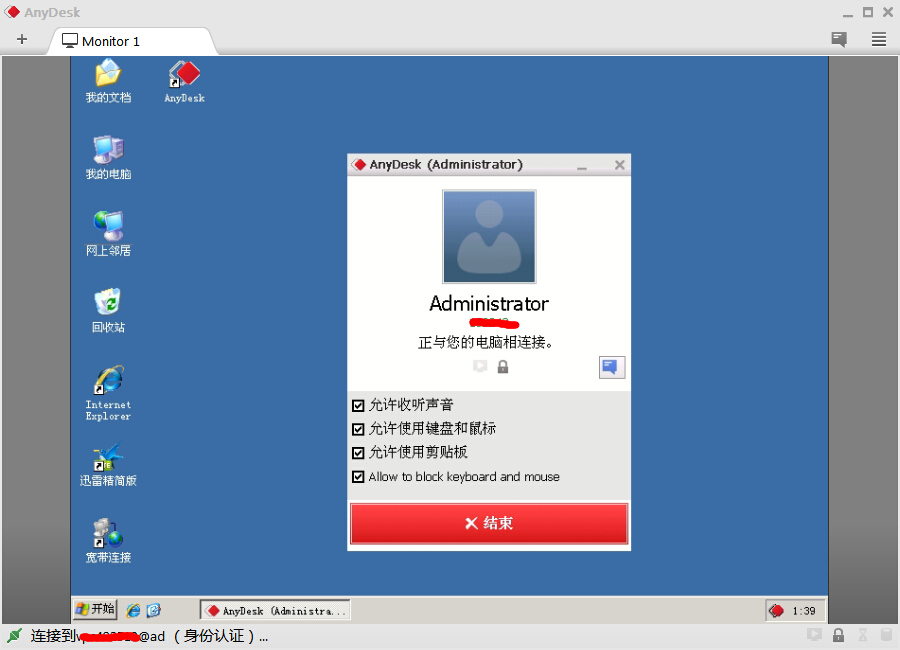
AnyDesk是一款号称速度最快的免费远程连接/远程桌面控制软件,据说是 TeamViewer 开发小组人员自立门户的产品,它拥有先进的视频压缩技 DeskRT 可轻松穿透防火墙/路由器,实测在电信、移动的跨网宽带环境下,速度确实要比 TeamViewer QQ 流畅。虽然目前软件为Beta版,但潜力巨大…
由于现今网络环境越来越复杂,防火墙、路...
<p href="http://14551.cn/tag/5" tag="" <a="">
<p href="http://14551.cn/tag/5" tag="" <a="">
AnyDesk是一款号称速度最快的免费远程连接/远程桌面控制软件,据说是 TeamViewer 开发小组人员自立门户的产品,它拥有先进的视频压缩技 DeskRT 可轻松穿透防火墙/路由器,实测在电信、移动的跨网宽带环境下,速度确实要比 TeamViewer QQ 流畅。虽然目前软件为Beta版,但潜力巨大…
由于现今网络环境越来越复杂,防火墙、路由器、宽带提供商等等各种因素常常会导致很多「直连」的远程控制软件(如微软的 Remote Desktop) 操作缓慢甚至是连接错误。 AnyDesk 给人的印象是速度极快、反应流畅迅速,比起前辈 TeamViewer 有过之而无不及,而且它体积仅还极为小 (1MB)
AnyDesk 为了解决远程桌面连接速度慢的问题,使用了名为 DeskRT 的底层技术,内置了先进的视频解码器,使得在复杂的网络坏境下依然能让用户体验到流畅远程桌面控制
AnyDesk 支持声音传输、支持画质设置、屏幕截图,重点还支持与远程电脑同步剪贴板!不仅是文字,即使是文件或文件夹,都能直接复制/粘贴到另一台电脑去,这点非常实用!功能还算比较丰富
AnyDesk 2.0.0 更新内容
Features
- Windows 10 compatibility
Fixed Bugs
- Fixed a crash at session start if the clipboard permissions were changed before session start.
- Fixed a crash at session start which could occur with some unicode user names when mouse input was forbidden.
- The clipboard did not work when connecting to the Logon screen and logging in a new user.
- Sometimes the forbidden cursor was displayed during the whole session when connecting into a Windows session which was created via RDP. This should not happen any more.
- Some settings from the security tab were not correctly applied. All default user permissions from the security tab are now applied for sessions.
- If the alias is too long for display, a smaller font is used.
- Fixed a rare crash when the mouse cursor had an invalid pixel format.
- The "Show remote cursor" feature displayed the mouse cursor in an incorrect position for all monitors except the first monitor. The cursor is displayed now correctly.
- Updated translations
新功
-Windows 10 兼容
修复 Bug
- 修正了在会话开始时如果剪贴板的权限被更改在会议开始之前
- 修正了在会话开始时鼠标输入可能发生一 unicode 用户名字禁止了
- 剪贴板没有不工作,当连接到登录屏幕,和在一个新的用户登录
- 有时禁止的光标整个会话期间显示连接成时这通过 RDP 创建 Windows 会话。这不应该再发生
- 从安全选项卡某些设置不准确,应用。所有默认的用户权限从安全选项卡是现在应用于会话
- 如果该别名还显示来说太长了,用较小的字号
- 修正了罕见的崩溃时鼠标光标了无效的像素格式
- "显示远程光标"功能为所有显示在错误的位置的鼠标光标除了第一个监视器的监视器。显示光标现在正确
- 更新翻译
<p href="http://14551.cn/tag/5" tag="" <a="">
<div class="newfujian">
    <div class="fileico rar">
    </div>
    <div class="filecont">
        <div class="filetit">
            <a title="点击下载" href="http://pan.baidu.com/s/1eQ98ngI" target="_blank" rel="nofollow">AnyDesk V2.0.0 中文</a><span>大小1.3M | 来源:百度网</span>
        </div>
        <div class="fileaq">
            已经过安全软件检测无毒,请您放心下载
        </div>
    </div>
    <div class="down_2">
        <a title="点击下载" href="http://pan.baidu.com/s/1eQ98ngI" target="_blank" rel="nofollow"></a>
    </div>
</div>

发表评论