转:ADO.NET入门2)(连接到数据库

难点:取得连接字符串
数据库编程的第一步,就得跨步连接到数据库。它的工作由一个类来完成Connection类完成
后面例子情况
vb2012 SQLserver2012
数据库实例:http://download.csdn.net/detail/dzweather/5033811
Connecttion要连接不同的数据库,就得取不同的情况
为了简化,为以后进一步学习打基础,就学一下连接SQLserver的情况,其它情况,有了本次恋爱经历,再学习
SQLserver数据库的连接类,使用的是 SqlConnection对象 它的目的就是创建与SQLserver数据库的连接
SqlConnection对象有自己的属性和方法。先过一
SQLConnection属
ConnectionString 获取或设置用于打开数据库SQlserver的字符串
Database 数据库名称(eg:学生成绩管理系统
State 获取连接数据的当前状
Provider 包含SQlconnection对象的数据提供者名
ServerVersion 连接SQlserver实例的版本(字符串)
DataSource 获取连接的实例名称(服务器名称)
ConnectionTimeOut 连接超时时间
PacketSize 通讯的网络数据包大小
SQlconnection方法
Open() 打开一个数据库
Close() 关闭。。。
Execute() 执行SQL语句,返回一个RecorderSet对象
[vb] view plaincopyprint?
Imports System.Data.SqlClient
Module Module1
    Sub Main()
        Dim cn As New SqlConnection
        cn.ConnectionString = "Password=123456;User ID=sa;Initial Catalog=学生成绩管理系统;Data Source=QZHENG"
        cn.Open()
        If cn.State = ConnectionState.Open Then
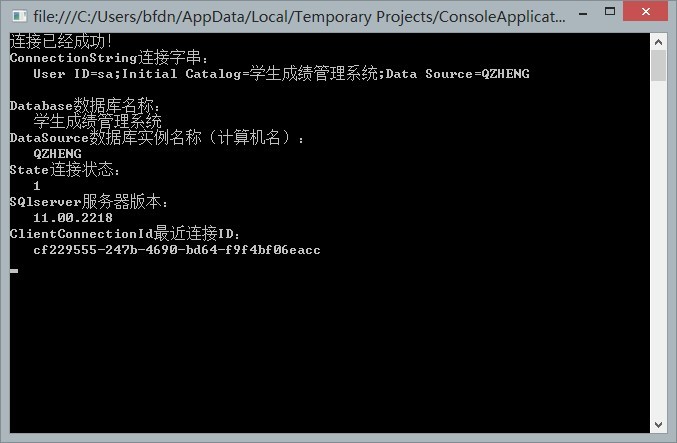
            Console.WriteLine("连接已经成功")

            Console.WriteLine("ConnectionString连接字串")
            Console.WriteLine("   " & cn.ConnectionString.ToString)
            Console.WriteLine()
            Console.WriteLine("Database数据库名称:")
            Console.WriteLine("   " & cn.Database)
            Console.WriteLine("DataSource数据库实例名称(计算机名):")
            Console.WriteLine("   " & cn.DataSource)
            Console.WriteLine("State连接状态:")
            Console.WriteLine("   " & cn.State)
            Console.WriteLine("SQlserver服务器版本:")
            Console.WriteLine("   " & cn.ServerVersion)
            Console.WriteLine("ClientConnectionId最近连接ID")
            Console.WriteLine("   " & cn.ClientConnectionId.ToString)
        End If
        cn.Close()
        Console.ReadKey()
    End Sub
End Module
发表评论